How to Translate VTT Files

TABLE OF CONTENTS
As video dominates the web, captions have become essential for reaching global, accessible audiences. The WebVTT (.vtt) file format is the modern standard for displaying timed text in HTML5 video, making it a critical asset in any localization workflow.
Translating VTT files requires more than just swapping words. You need to preserve timestamps, styling, and on-screen positioning while ensuring your message resonates accurately in any language. This guide covers everything from VTT basics to professional translation workflows that deliver results.
What is a VTT File?
A WebVTT (Web Video Text Tracks) file is a plain text file containing subtitles or captions with timing and styling information. It’s the native format for HTML5 video players in modern browsers.
Here’s a basic example:
WEBVTT

NOTE
This is a comment for the translator. It will not be displayed.

00:00:05.500 --> 00:00:09.250
Hello and welcome to our presentation.

00:00:09.750 --> 00:00:13.000
In this video, we will explore the future of technology.
The structure consists of:
WEBVTTHeader: Every file must start with this line.- Timestamps: The
HH:MM:SS.mmm --> HH:MM:SS.mmmformat defines when captions appear and disappear. - Cues: The actual subtitle text displayed on screen.
- Notes (Optional): Comments ignored by video players, useful for providing translator context.
VTT vs SRT: What’s the Difference?
What sets VTT apart from older formats like SRT are its advanced features:
- Styling: Use HTML-like tags to format text with bold (
<b>), italic (<i>), or underlined (<u>) styling. - Positioning: Control exactly where captions appear using settings like
line(vertical position) andposition(horizontal position). This prevents text from covering important on-screen elements. - Metadata: The
NOTEfield allows comments and context, invaluable for professional translation workflows.
Here’s a quick comparison:
| Feature | WebVTT (.vtt) | SubRip (.srt) |
|---|---|---|
| File Header | WEBVTT (Required) | None |
| Styling | Yes (Bold, Italic, etc.) | Limited* |
| Positioning | Yes (Precise control) | No |
| Metadata/Comments | Yes (NOTE) | No |
| Best For | Modern Web Video | Broad Compatibility |
Note: While SRT officially doesn’t support styling, some players accept non-standard HTML tags. For cross-platform reliability, VTT is the better choice.
How to Translate VTT Files: Three Proven Methods
Choose your approach based on budget, timeline, and quality requirements.
Method 1: Manual Text Editing
Process: Open the VTT file in a text editor (Notepad++, VS Code, TextEdit) and manually replace text.
Pros:
- Free
- No additional tools needed
Cons:
- High risk of breaking timestamps
- Easy to corrupt styling tags
- No visual context while translating
- Character encoding issues common
Verdict: Only suitable for very short files (under 10 cues) with no styling. Even then, proceed with extreme caution.
Method 2: Subtitle Editing Software
Best Tools:
- Subtitle Edit (Windows, free, powerful)
- Aegisub (Cross-platform, free, professional-grade)
Workflow:
- Load your video file and original VTT into the editor
- Translate each cue line-by-line with video context visible
- Adjust timing if the translated text needs more/less display time
- Preview in real-time to check synchronization and readability
- Export as a new translated VTT file
Pros:
- Full control over timing and styling
- Visual context prevents translation errors
- Can adjust line breaks for readability
- Automatic validation of file structure
Cons:
- Steeper learning curve
- More time-intensive
- Requires video file access
Best For: High-stakes projects (marketing videos, e-learning courses, film subtitles) where quality and timing precision are paramount.
Estimated Time: 2-4 hours per 10-minute video for professional quality.
Method 3: Using an Online VTT Translator
For projects with tight deadlines or a large volume of files, an online translation tool offers the best balance of speed and safety. These services are designed to parse the file, translate only the text, and preserve the underlying structure.
A great example is the OpenL VTT Translator Online, a free tool built specifically for this purpose.
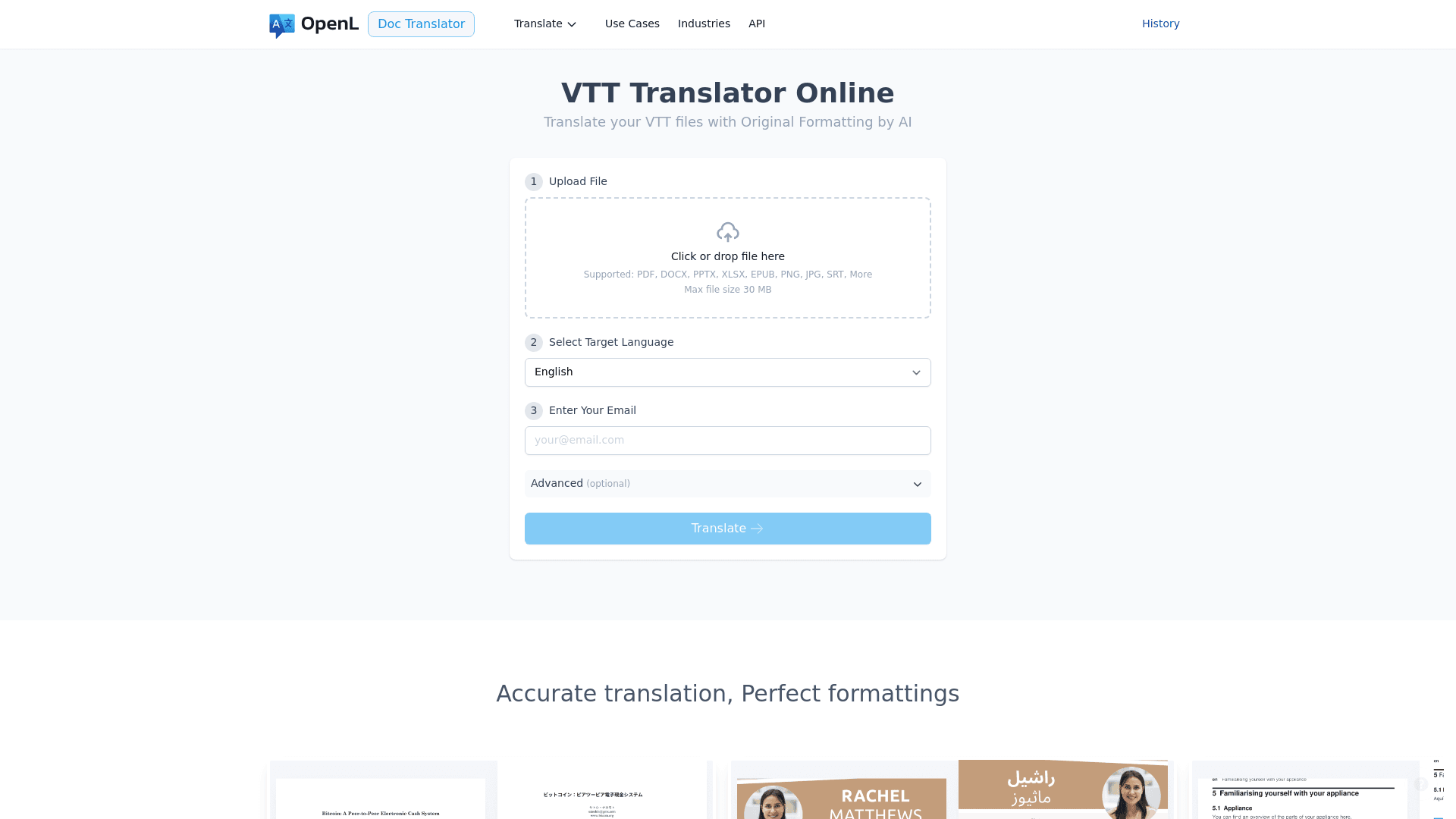
The workflow is designed for simplicity:
- Upload your .vtt file by dragging it onto the page or selecting it from your computer.
- Select your target language from the dropdown menu.
- Receive the translated file in your email, with all timestamps and styling tags perfectly intact.
This approach is ideal for translating internal training videos, product demos, or marketing content where a fast and reliable turnaround is essential.
Method Comparison: Quick Decision Guide
| Factor | Manual Editing | Subtitle Software | Online VTT Translator |
|---|---|---|---|
| Speed | Slow | Medium | Fast |
| Cost | Free | Free | Varies |
| Quality Control | Low | High | Medium |
| Learning Curve | None | Medium | Low |
| Best Volume | 1-2 files | 5-20 files | 20+ files |
| Risk Level | High | Low | Medium |
Best Practices for Professional VTT Translation
Follow these guidelines regardless of which method you choose:
1. Preserve Technical Elements
DO:
- Keep all styling tags:
<b>Important</b>→<b>重要</b> - Maintain positioning cues:
line:80% position:50% - Preserve timestamp format exactly
DON’T:
- Remove or modify timing codes
- Delete empty lines between cues
- Change the
WEBVTTheader
2. Use UTF-8 Encoding (Critical)
Always save VTT files with UTF-8 encoding to prevent character corruption. This is especially important for languages with special characters (accents, non-Latin alphabets, Chinese, Arabic, etc.).
How to verify:
- Most modern text editors display encoding in the bottom toolbar
- When saving, explicitly select “UTF-8” or “UTF-8 without BOM”
3. Optimize Line Length and Reading Speed
Reading speed guideline: 17-20 characters per second maximum
Line length rules:
- Maximum 2 lines per cue
- Approximately 42 characters per line (including spaces)
- Split longer sentences at natural phrase boundaries
Example:
❌ Too long:
00:00:05.000 --> 00:00:09.000
In this comprehensive tutorial we will explore the fundamental concepts of machine learning.
✅ Better:
00:00:05.000 --> 00:00:09.000
In this comprehensive tutorial we will explore
the fundamental concepts of machine learning.
4. Consider Cultural Context
- Adapt idioms and expressions rather than translating literally
- Respect right-to-left (RTL) language requirements for Arabic, Hebrew, etc.
- Adjust formality levels based on target culture
- Consider regional variations (Latin American Spanish vs. European Spanish)
5. Perform Quality Assurance
QA Checklist:
- Load translated VTT with video and watch completely
- Check synchronization at beginning, middle, and end
- Verify no text overflows screen boundaries
- Confirm special characters display correctly
- Test on target playback platform (web player, mobile, etc.)
- Review for contextual accuracy and natural phrasing
- Validate file structure (use a VTT validator tool)
Before and After Example
Here’s what a professional translation preserves:
Original (English):
WEBVTT

NOTE
Product launch video - maintain enthusiastic tone

00:00:02.000 --> 00:00:05.500 line:80%
<b>Introducing</b> the future of smart home technology.

00:00:06.000 --> 00:00:09.000
Control everything with a single voice command.
Translated (Spanish):
WEBVTT

NOTE
Product launch video - maintain enthusiastic tone

00:00:02.000 --> 00:00:05.500 line:80%
<b>Presentamos</b> el futuro de la tecnología del hogar inteligente.

00:00:06.000 --> 00:00:09.000
Controla todo con un solo comando de voz.
Notice: timestamps unchanged, styling preserved, positioning intact, NOTE kept for context.
Common Errors and How to Fix Them
Error 1: Garbled Characters (�)
Cause: Wrong file encoding Solution: Resave file as UTF-8 encoding
Error 2: Subtitles Don’t Appear
Cause: Missing or modified WEBVTT header
Solution: Ensure first line is exactly WEBVTT (case-sensitive, no extra spaces)
Error 3: Timing Issues
Cause: Accidentally modified timestamp during translation
Solution: Use “Find” feature to locate timestamp format --> and verify all timestamps are intact
Error 4: Broken Styling
Cause: Unclosed tags or deleted tag syntax
Solution: Verify every <b> has a </b>, every <i> has a </i>, etc.
Error 5: Text Overlaps Video Elements
Cause: Different text lengths in translation Solution: Adjust positioning values or split into multiple shorter cues
Frequently Asked Questions
Q: Can I use Google Translate for VTT files? A: Not directly. Google Translate will break the file structure. You need a tool that preserves formatting, or you must manually copy/paste text only (error-prone).
Q: How much does professional VTT translation cost? A: Rates vary by language pair and quality tier. Expect $3-8 per minute of video for professional human translation, or $0.50-2 per minute for machine translation with human review.
Q: Do I need separate VTT files for each language?
A: Yes. Each language requires its own VTT file (e.g., video-en.vtt, video-es.vtt, video-fr.vtt).
Q: Can I auto-generate and translate VTT files? A: Yes. Tools like YouTube can auto-generate captions, which you can then export as VTT and translate. However, auto-generated captions often need significant editing for accuracy.
Q: What’s the difference between subtitles and captions? A: Subtitles translate dialogue for viewers who don’t speak the language. Captions include dialogue plus sound effects and are designed for deaf/hard-of-hearing viewers. VTT supports both.
Conclusion: Choose the Right Workflow
Translating VTT files effectively unlocks your video content for global audiences. Here’s how to choose:
- For 1-5 files with high stakes: Use subtitle editing software (Method 2)
- For 10+ files or tight deadlines: Use automated translation tools (Method 3)
- For ongoing localization needs: Establish a hybrid workflow: automated translation + human review
By understanding VTT structure and following professional best practices, you can ensure your message is delivered clearly and professionally, no matter where your audience is watching.
Ready to translate? Start with a single test file, follow this guide, and scale up as you refine your workflow. Your global audience is waiting.