Best User Manual Translator in 2026
TABLE OF CONTENTS
Translating user manuals is not like translating blog posts or marketing copy. A mistranslated torque specification can void warranties. A poorly localized safety warning can trigger product recalls. An inconsistent part number can confuse technicians and cause assembly failures.
User manuals carry safety warnings, regulatory compliance language, and step-by-step instructions that customers rely on while operating machinery or assembling products. The stakes are higher, the requirements stricter, and the consequences of errors more severe.
If you’re looking for a step-by-step workflow guide, check out our companion article: How to Translate User Manuals. This article focuses on choosing the right tools for the job.
We tested eight leading translation solutions over three weeks, evaluating them specifically for user manual translation using real technical documents across multiple language pairs.
Why User Manual Translation Is Different
Before diving into tools, understand what makes user manual translation uniquely challenging:
Safety warnings are not just text—they’re standardized components. Signal words like DANGER, WARNING, CAUTION, and NOTICE follow ANSI Z535.6 and IEC 82079 standards (see also this ANSI Z535 overview for a plain-language explanation). Their hierarchy, formatting, and placement must remain consistent across languages. Weakening a “DANGER” to a “CAUTION” in translation could expose manufacturers to liability.
Regulatory compliance is non-negotiable. Manuals for products sold in the EU, US, or other regulated markets must include mandatory sections, declarations of conformity, and safety markings. CE, UKCA, FCC, FDA, and IEC standards define what must appear and how.
Terminology consistency trumps natural language. The same part, action, or component must use identical terminology throughout the manual—and match UI strings, packaging labels, and service documentation. “Toggle switch,” “flip switch,” and “lever” cannot be used interchangeably.
Diagrams and callouts need special handling. Exploded views, numbered steps, and annotated screenshots contain text that must be translated while preserving layout. Text expansion of 20–30% in languages like German can break callout positioning.
Data accuracy is zero-tolerance. Torque values, temperatures, voltages, part numbers, and error codes must transfer exactly. A decimal point in the wrong place or a unit conversion error can cause equipment damage or personal injury.
The 8 Best User Manual Translators in 2026
1. OpenL Doc Translator — Best Overall for Formatting Excellence
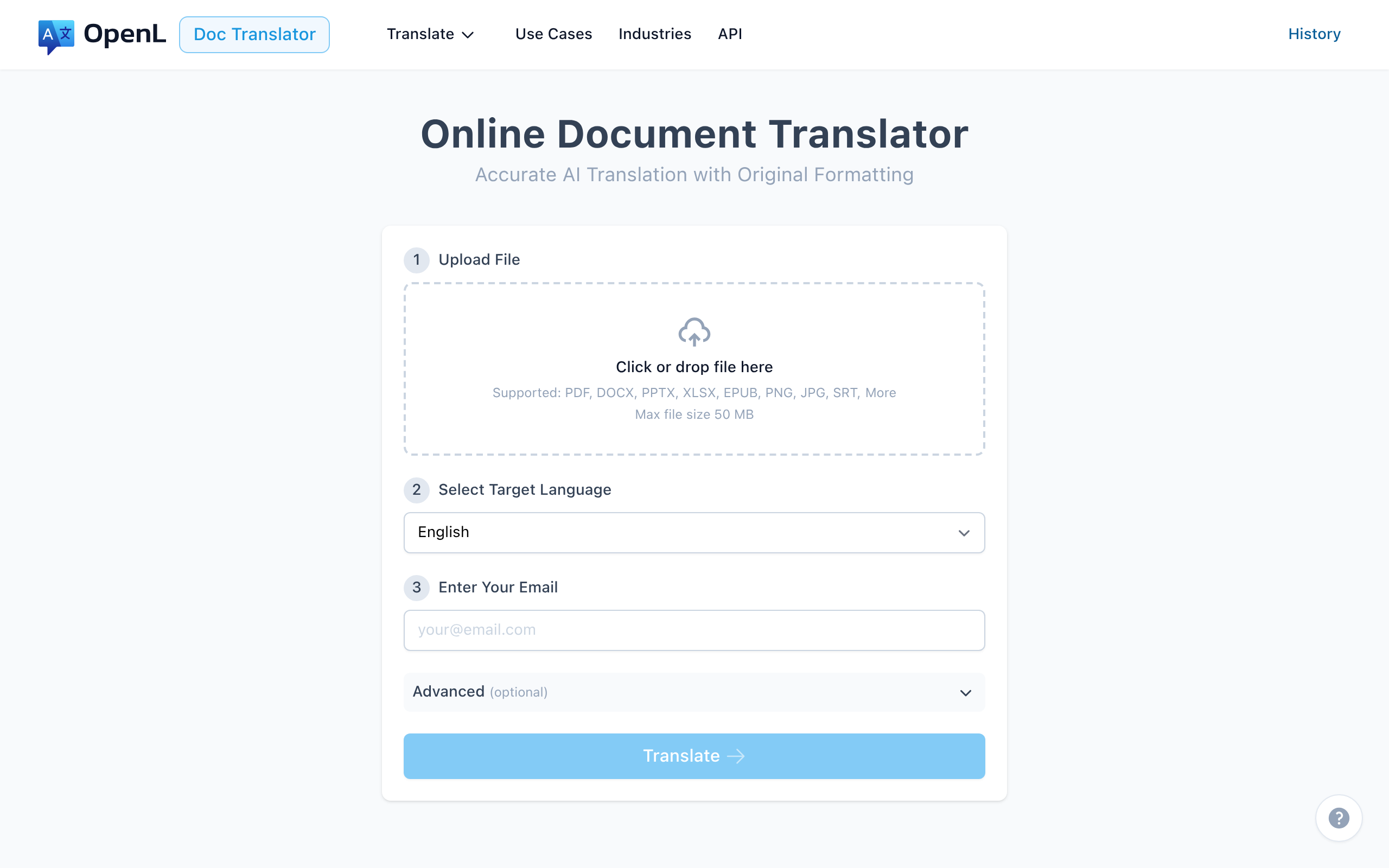
OpenL Doc Translator delivers exceptional formatting preservation and professional-quality translations, making it ideal for user manuals with complex layouts. It also ranks highly in our Best PDF Translator comparison for document translation.
Key Specifications:
- Languages: 100+ including RTL (Arabic, Hebrew)
- File Formats: PDF, DOCX, PPTX, XLSX, IDML, EPUB, HTML, Markdown
- File Size Limit: 50 MB (100 MB for Ultimate)
- Pricing: Pay-per-use; Pro from $9.90/month
Pros:
- Exceptional layout preservation for diagrams and tables
- Handles scanned PDFs with built-in OCR
- Advanced Mode for technical content
- No subscription required—pay only for what you use
- 30% discount for educators
Cons:
- No built-in terminology database
- Limited version control for long-term maintenance
- Requires human review for safety-critical content
Best For: Small teams and businesses needing high-quality first drafts with perfect formatting, especially for consumer electronics and software manuals.
Quick Test: Upload 1–2 pages (a safety warning + a diagram page) to OpenL Doc Translator to validate formatting preservation before translating your full manual.
2. Trados Studio (RWS) — Best for Enterprise Terminology Management
Trados Studio (formerly SDL Trados) remains the industry-standard CAT tool for professional translators, offering robust terminology management and translation memory that’s essential for maintaining consistency across large manual sets.
Key Specifications:
- Languages: 100+ with deep European language support
- File Formats: 60+ including IDML, XML, DITA, FrameMaker
- Deployment: Desktop with cloud sync option
- Pricing: From $25/month (Freelance) to $2,933 perpetual license
Pros:
- Industry-standard translation memory system
- MultiTerm for comprehensive terminology management
- Extensive QA checks (numbers, punctuation, terminology)
- Strong IDML and InDesign support
- Required by many LSPs and enterprise clients
Cons:
- Steep learning curve
- High upfront cost for perpetual license
- Primarily designed for professional translators, not end users
- Requires separate DTP work for complex layouts
Best For: Translation agencies and enterprises with large, ongoing manual translation projects requiring strict terminology control and audit compliance.
3. memoQ — Best Balance of Power and Usability
memoQ offers a more intuitive interface than Trados while maintaining professional-grade features, making it an excellent choice for teams transitioning from simpler tools.
Key Specifications:
- Languages: 100+ languages
- File Formats: IDML, XML, XLIFF, and 50+ more
- Deployment: Desktop and cloud (memoQ TMS)
- Pricing: $770 perpetual (Translator Pro); TMS from custom pricing
Pros:
- More intuitive UI than Trados
- Excellent interoperability (imports Trados files)
- Strong QA features with customizable checks
- LiveDocs for reference document correlation
- Good value for mid-sized teams
Cons:
- Windows-only
- Full collaboration requires memoQ Server
- Some advanced features have learning curve
Best For: Mid-sized companies and LSPs who want CAT tool power without Trados complexity, especially for ongoing manual maintenance.
4. DeepL Pro — Best for European Language Quality
DeepL consistently produces the most natural-sounding translations for European languages, making it valuable as a first-pass tool for manuals targeting EU markets. For a detailed comparison, see our Best DeepL Alternative guide.
Key Specifications:
- Languages: 30+ languages (focused quality over quantity; see current list)
- File Formats: PDF, DOCX, PPTX
- Processing Speed: Instant
- Pricing: From $8.74/month; API from $20/million characters
Pros:
- Superior translation quality for Germanic and Romance languages
- Custom glossaries for terminology consistency
- Tone selection (formal/informal)
- Fast processing
- Files deleted after translation (Pro; see data policy)
Cons:
- Fewer languages than competitors (language availability varies by region)
- Complex layouts lose formatting
- No translation memory
- Not suitable as standalone solution for regulated content
Best For: First-draft translations for European market manuals, combined with human review and CAT tool integration.
5. SYSTRAN — Best for Regulated Industries and Security
SYSTRAN offers industry-specific translation models and on-premise deployment options, making it the go-to choice for organizations with strict security requirements.
Key Specifications:
- Languages: 55+ with industry specializations
- Deployment: Cloud, Private Cloud, or On-Premise
- Industry Models: Legal, Medical, Technical, Financial
- Pricing: Pro Plus from €17.99/month; Enterprise custom pricing
Pros:
- Industry-specific translation models (Medical, Legal, Technical)
- On-premise deployment for maximum security
- Neural Fuzzy Adaptation from translation memories
- Custom model training available
- Used by NASA, government agencies
Cons:
- Higher cost than consumer tools
- Complex setup for enterprise deployment
- Learning curve for model customization
Best For: Medical device manufacturers, defense contractors, and enterprises requiring air-gapped translation solutions with comprehensive audit logging.
6. Phrase (formerly Memsource) — Best Cloud-Based TMS for Teams
Phrase leads cloud-based translation management, offering excellent collaboration features and MT integration that works well for distributed manual translation teams.
Key Specifications:
- Languages: 500+ language pairs
- File Formats: 60+ including IDML, XML, JSON
- Deployment: Cloud-native
- Pricing: From $29/month; Enterprise custom
Pros:
- Accessible from anywhere with real-time collaboration
- Excellent MT engine integration (DeepL, Google, Amazon)
- Strong automation for repetitive workflows
- API for integration with CMS and PIM systems
- Visual context for translators
Cons:
- Requires internet connection
- Per-user pricing can add up for large teams
- Less granular control than desktop CAT tools
Best For: Distributed teams managing multilingual manual content with frequent updates and need for cloud accessibility.
7. Google Translate (with Human Review) — Best Budget Option
Google Translate provides a cost-effective starting point for manual translation, but requires significant human review for technical accuracy. See our Best Google Translate Alternative for more options.
Key Specifications:
- Languages: 200+ languages (see supported list)
- File Formats: Limited (DOCX, PDF, PPTX via Docs)
- Pricing: Free (web); API from $20/million characters
Pros:
- Free for basic use
- Widest language coverage (200+ languages)
- Instant processing
- Good for quick understanding of content
Cons:
- Not suitable for safety-critical content without review
- No terminology control
- Poor formatting preservation
- Free tier data policies differ from paid/API; review terms
- No compliance or audit features
Best For: Internal reference translations or first drafts for non-critical content, always with mandatory human review.
8. Lingvanex — Best for Offline and Privacy-First Translation
Lingvanex stands out for complete offline functionality, making it suitable for translating sensitive manuals in air-gapped environments.
Key Specifications:
- Languages: 109 languages
- Deployment: Cloud and Desktop (offline capable)
- File Formats: DOC, DOCX, PDF, PPTX, XLSX, TXT
- Pricing: Basic $6.99/month; Ultimate $69.99/month
Pros:
- Full offline translation capability
- 109 language support
- Strong privacy (no data leaves device when offline)
- Cross-platform (Windows, macOS, Linux, mobile)
- Affordable pricing
Cons:
- Lower accuracy than cloud-based competitors
- No translation memory or terminology management
- Slower processing than online tools
- Requires local storage for language packs (2GB+)
Best For: Organizations handling classified or highly sensitive manuals that cannot use cloud translation services.
Quick Comparison: Best Tool by Scenario
Choose your priority:
- Formatting-critical docs (diagrams, callouts): OpenL Doc Translator
- Enterprise terminology control (10+ manuals): Trados Studio or memoQ
- Regulated industries (medical, defense): SYSTRAN (on-premise option)
- European language quality: DeepL Pro
- Cloud collaboration for distributed teams: Phrase TMS
- Maximum privacy/offline: Lingvanex
- Budget-conscious (with human review): Google Translate
Looking for other translation tool comparisons? Check out our guides on the best PPT translators, best SRT translators, and best image translators.
Decision Framework: 6 Questions to Choose Your Tool
Answer these questions to find the right solution for your manual translation needs:
1. Is your product regulated (medical, industrial, CE/UKCA)?
Yes → SYSTRAN or Trados Studio (audit logging, compliance features) No → OpenL Doc or DeepL for faster workflows
2. Do you need to maintain terminology across 10+ manuals?
Yes → Trados Studio or memoQ (professional TM/TB systems) No → OpenL Doc or Phrase for simpler projects
3. What’s your source file format?
IDML/InDesign → Trados Studio, memoQ, or Phrase PDF (digital) → OpenL Doc, DeepL Scanned PDF → OpenL Doc (OCR built-in) or ABBYY + CAT tool
4. How often do you update manuals?
Frequently (monthly+) → CAT tools with TM (Trados, memoQ, Phrase) Rarely → Pay-per-use options (OpenL Doc)
5. Can you use cloud services?
No (security/compliance) → SYSTRAN (on-prem) or Lingvanex (offline) Yes → Phrase, OpenL Doc, or DeepL
6. What’s your budget?
< $100/month → OpenL Doc, DeepL, or Google + human review $100-500/month → Phrase or memoQ $500+/month or perpetual → Trados Studio or SYSTRAN Enterprise
MVP Workflow for Small Teams
Even without enterprise CAT tools, you can achieve professional manual translation:
1. Pre-Translation Setup (Do Once)
- Create a do-not-translate list: part numbers, model names, error codes, UI labels
- Build a basic glossary: 50-100 key terms with approved translations
- Prepare clean source files: editable formats (DOCX, IDML), not flattened PDFs
- Document unit conventions: metric/imperial, date formats by market
2. Translation Phase
- Use AI translation (OpenL Doc or DeepL) for first draft
- Apply glossary during translation or post-edit
- Translate in batches: safety chapter first, then procedures, then reference
3. Quality Assurance (Three Layers)
- Linguistic QA: Native speaker review for natural language
- Technical QA: SME check of values, units, part numbers, safety warnings
- Compliance QA: Regulatory sign-off on mandatory sections
4. Post-Translation
- Archive source and translated files with version numbers
- Document reviewer approvals for audit trail
- Update glossary with any new terms
FAQ
Can I use free translation tools for user manuals?
Free tools like Google Translate can provide initial drafts, but should never be used as the final translation for user manuals—especially those containing safety information. The risk of incorrect safety warnings, unit conversions, or regulatory language is too high. Always pair free tools with professional human review.
How do I handle safety warning translation?
Safety warnings following ANSI Z535.6 or IEC 82079 require special attention:
- Keep signal word hierarchy intact (DANGER > WARNING > CAUTION > NOTICE)
- Preserve formatting blocks—don’t merge warning text into regular paragraphs
- Use approved translations for each signal word in your target language
- Maintain icon and color placement
- Have a native speaker with technical knowledge review all warnings
What about translating scanned PDF manuals?
For scanned PDFs, you need OCR before translation. OpenL Doc Translator has built-in OCR capability. For complex legacy documents, consider ABBYY FineReader for OCR, then import to a CAT tool. Always verify OCR accuracy—especially for numbers, symbols, and technical terms—before translation. Learn more in our guide on How to Translate a Scanned PDF.
How do I maintain consistency across multiple manual versions?
Use a CAT tool with translation memory (Trados Studio, memoQ, or Phrase) to:
- Store all previous translations for reuse
- Automatically suggest matches for repeated content
- Ensure terminology stays consistent across updates
- Track changes between versions for delta translation
Is AI translation accurate enough for technical manuals?
Modern AI translation (DeepL, OpenL, SYSTRAN) handles technical content well but still requires human review for:
- Safety-critical sections
- Regulatory compliance language
- Industry-specific terminology
- Cultural adaptation
- Unit conversions requiring verification
The best approach is AI for speed, humans for accuracy—use AI for first drafts, then have qualified reviewers check technical accuracy. For a detailed quality assurance process, check out our Translation QA Checklist: 15 Must-Check Items.
Final Recommendations
For small teams needing quick, well-formatted results: Start with OpenL Doc Translator for excellent formatting preservation, then implement human review for safety content.
For enterprises with ongoing manual localization: Invest in Trados Studio or memoQ for terminology management and translation memory that pays dividends over time.
For regulated industries (medical, industrial, defense): SYSTRAN with on-premise deployment provides the security and audit trails you need for compliance.
For distributed teams with cloud workflows: Phrase offers the collaboration and integration features modern content teams expect.
Remember: no translation tool replaces human expertise for safety-critical content. The best workflow combines AI speed with human judgment—use automation to handle volume, but always have qualified reviewers verify warnings, values, and compliance language. For a complete workflow guide, read our article on How to Translate User Manuals.
References
- ANSI Z535.6-2023: Product Safety Information in Product Manuals, Instructions, and Other Collateral Materials
- IEC/IEEE 82079-1:2019: Preparation of information for use of products
- Taia Blog: Best Translation Software in 2025. Retrieved from https://taia.io/blog/technology-and-translation/best-translation-software/
- X-doc.ai: Ultimate Guide - The Top 5 Technical Manual Translators 2025. Retrieved from https://x-doc.ai/articles/en/the-top-5-technical-manual-translators
- memoQ Pricing. Retrieved from https://www.memoq.com/pricing/
- SYSTRAN Pricing. Retrieved from https://www.systransoft.com/pricing/
- DeepL Press Release: DeepL accelerates global business connectivity and document translation with new languages (June 2025)
- OpenL Doc Translator. Retrieved from https://doc.openl.io/